066df02cbf
Overview of existing implementation
-----------------------------------

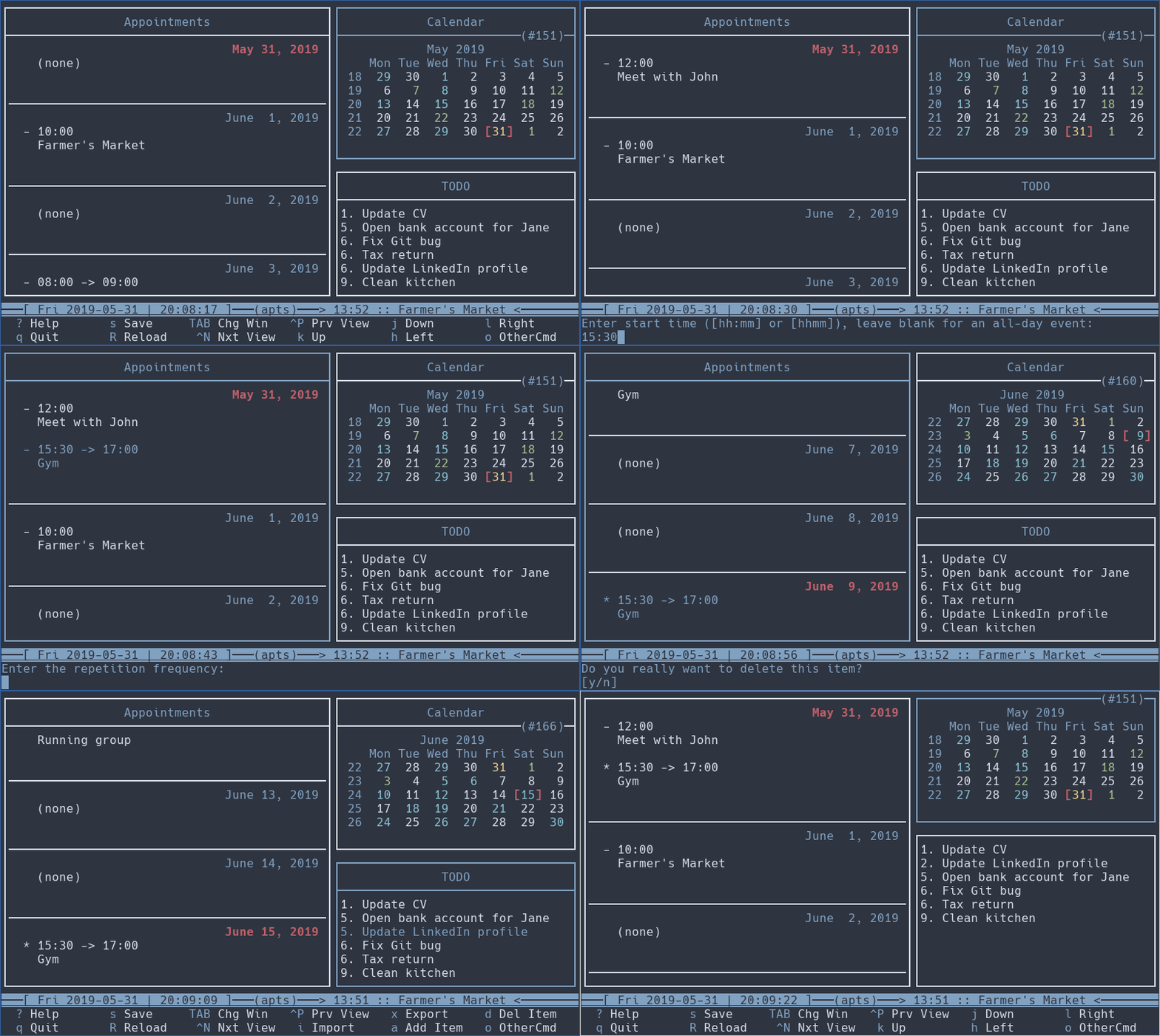
The APP panel displays the 'day_items' vector in the 'lb_apt' listbox. A
listbox consists of a scrollwin (structure) in which a number of items
is displayed. The listbox keeps track of:

    - the number of items
    - the selected item
    - the type of each item in an array type[]
    - the height of each item (ie. how many screen lines) in an array ch[]
    - how to display an item (on the screen)

The latter three are handled by functions fn_type(), fn_height(),
fn_draw(). The first two are used to fill in the corresponding array
entry, type[] or ch[], for item number i, the third draws item number i.

The items are taken from the global variables

    vector_t day_items
    int      day_items_nb

in day.c. Items include captions (DAY_HEADING, DAY_SEPARATOR).
Everything is sorted for display (DAY_HEADING, events, DAY_SEPARATOR,
appts).  These are filled in ("stored") [by day_store_items() for the
selected day in the calendar], before being "loaded" into the listbox.
See do_storage() in calcurse.c and ui_day_item_add() in ui-day.c.

New APP panel design
--------------------

Several days are displayed in the APP panel by loading them with
day_store_items().

With several days come several headings and separators. DAY_SEPARATOR is
reinterpreted to separate days, and a new separator, EVNT_SEPARATOR,
separates events from appointments. To sort everything, an 'order'
member of type time_t is added to the day_item structure. It is set for
headings and separators as well as for appointments and events as
follows:

    item            order
    ---------------------
    DAY_HEADING     BGNOFDAY (= midnight)
    EVNT_SEPARATOR  BGNOFDAY
    DAY_SEPARATOR   ENDOFDAY
    event           start time (midnight)
    appointment     start time (first day)
                    BGNOFDAY (following days, if any)

The sort function day_cmp() (used by vector_sort) is extended to sort by
order first.

The order field always indicates the day to which an item belongs. This
comes in handy, because with several days in the APP panel it is
necessary to distinguish between the selected day in the calendar and
the selected day in the APP panel.  This raises the question which day
should actions (commands) operate on: the one selected in the calendar
or the one selected in the APP panel? Unquestionably the one on the APP
panel which is the one tacitly implied. In most cases it is not a
problem, though, because actions work on the selected item and the
selected day does not come into play. But in some cases it does:

    delete item     When deleting an occurrence of a repeated item, the
                    selected day is the exception day to add.

    view item       day_popup_item() needs the day of the selected item
                    for display of correct start/end times.

    cut/paste item  Paste needs the selected day in which to paste.

    add item        The day of the new item is taken from the calendar.
                    Instead a dummy event is inserted in an empty day.
                    This makes the day selectable, which is otherwise
                    impossible with only the DAY_HEADING displayed.  The
                    dummy event is selectable but cannot be edited or
                    deleted (but viewed or piped).

With more than one day in the day_items vecter, an appointment spanning
more than one day may occur more than once in the vector (with start/end
times suitably adjusted for display). A day_item is no longer (always)
identified by the aptev_ptr (item) value. Instead the combination
(order, item.<ptr>) is used; order is roughly the day.

Signed-off-by: Lars Henriksen <LarsHenriksen@get2net.dk>
Signed-off-by: Lukas Fleischer <lfleischer@calcurse.org>
calcurse
Building
Install the following build dependencies. If your distro segments development files from core packages (i.e., *-devel or *-dev packages), you may need to install those as well:
- gcc
- automake
- asciidoc
- gettext with development files
- ncurses with development files
If you are using a release tarball, the following commands can be used to build and install calcurse:
$ ./configure
$ make
$ make install
Note that make install needs to be run as root. When working on a Git
checkout, you need to run ./autogen.sh before ./configure.
Package Overview
build-aux: auxiliary files for the build processcontrib: useful tools such as hooks or the CalDAV synchronization scriptdoc: detailed documentation in plain text and HTMLpo: translations and i18n-related filesscripts: additional official scripts, such ascalcurse-upgradesrc: the actual calcurse source filestest: test suite and test cases for calcurse
Authors
calcurse was originally authored by Frederic Culot and is currently maintained by Lukas Fleischer.
Of course, there are numerous other contributors. Check the Git commit log and
the Thanks section in the manual for a list of people who have contributed by
reporting bugs, sending fixes, or suggesting improvements.
Contributing and Donations
Patches, bug reports and other requests are always welcome! You can submit them to one of our mailing lists (check the patch submission guidelines for details) or via GitHub.
We are also extremely grateful for donations which help us continue developing calcurse as open source software and are used to cover recurring costs, such as for our servers. You can use https://calcurse.org/donate/ for a one-time payment. If you prefer another form of donation, do not hesitate to contact us!
Demo